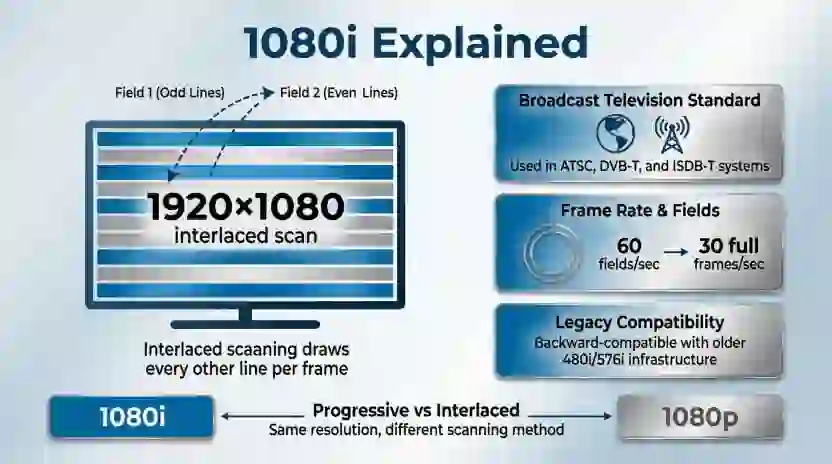
Choosing between 1080i and 1080p can be confusing because both formats use a resolution of 1920 × 1080 pixels. Yet they do not display images in the same way. 1080p is generally better for sharp, smooth motion, gaming, and modern screens, while 1080i can still be suitable for some television broadcasts.
The main difference is how each format draws an image on the screen. The letter “i” stands for interlaced, while “p” stands for progressive. These terms describe how the image is displayed, not the number of pixels in its full resolution.
You may see these labels when comparing TVs, cable channels, streaming devices, gaming consoles, and video settings. A television may support both formats, but that does not mean they will look equally clear in every situation.
Understanding 1080i or 1080p helps you choose the right video setting for your needs. This guide explains how each format works, compares picture quality, and shows when you should use one over the other. It also covers common mistakes, regional broadcast differences, and practical advice for getting the best picture from your screen.
1080i or 1080p: The Quick Answer
1080p is usually the better choice because it displays all 1,080 horizontal lines in each complete frame. This helps produce sharper images, especially when objects move quickly. 1080i displays the image in two alternating fields, which can cause motion artifacts. However, the final picture also depends on the source, frame rate, screen, and video processing.
1080i or 1080p: Quick Answer
Choose 1080p if you want the best general picture quality from a Full HD display. It is especially useful for gaming, sports, movies, and computer screens.
Here is a simple guide:
- Choose 1080p: For gaming, streaming, Blu-ray movies, and fast-moving scenes.
- Choose 1080i: When a broadcast service provides it and your TV handles interlaced video well.
- Check your device: Some TVs and receivers convert 1080i into progressive video before displaying it.
- Consider the source: A high-quality 1080i broadcast may look better than a poor-quality 1080p video.
For example, a football match recorded and delivered in 1080p can show motion more cleanly than an interlaced version. A movie streamed in 1080p can also look sharp on a Full HD television. However, changing a low-quality video to 1080p does not automatically improve its original detail.
What Does 1080i or 1080p Mean?
Both 1080i and 1080p belong to the family of high-definition video formats. They commonly use a resolution of 1920 × 1080 pixels, also called Full HD.
That resolution contains 1,920 pixels across each horizontal line and 1,080 lines from top to bottom. The key difference is how those lines are used to build each displayed image.
What Is 1080i?
1080i means 1080-line interlaced video. Instead of sending all the image lines together, the format divides them into two fields.
One field contains one set of alternating lines. The next contains the other set. Together, the two fields form a complete image.
For example, a 1080i signal with 50 fields per second uses two fields for each complete frame, resulting in 25 interlaced frames per second. A signal with 60 fields per second typically represents 30 frames per second, although exact broadcast timing can vary.
Interlacing was developed to make efficient use of broadcast bandwidth while maintaining a high perceived image resolution. It remains relevant in some television broadcasting systems.
Its main weakness appears when parts of the image change between fields. Fast movement can create comb-like edges, flicker, or reduced clarity if the display does not process the signal well.
What Is 1080p?
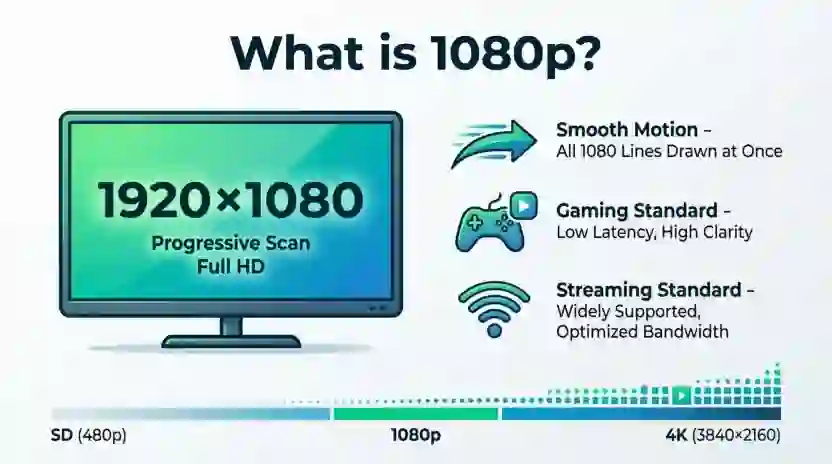
1080p means 1080-line progressive video. Each frame contains all 1,080 horizontal lines, displayed in sequence.
For example, 1080p30 displays 30 complete frames each second, while 1080p60 displays 60 complete frames each second. The higher frame rate can make movement appear smoother when the source and display both support it.
Progressive scanning is widely used in streaming, gaming, computers, and modern video production.
It avoids the specific interlacing artifacts associated with 1080i. However, picture quality still depends on the original recording, compression, frame rate, and display capabilities.
The Origin of 1080i and 1080p
Interlaced video came from the early development of television. Traditional broadcast systems had limited bandwidth, so engineers needed ways to deliver moving images efficiently.
Interlacing split each frame into two fields. This approach helped create the perception of smoother motion without transmitting every line as part of a complete progressive frame at the same rate.
As video technology improved, progressive scanning became increasingly practical. Digital cameras, computers, game consoles, streaming platforms, and modern displays could work with complete frames more easily.
The growth of digital video and high-definition displays made 1080p more common for consumer content. Many modern TVs can also process interlaced signals, allowing older broadcast formats to remain usable.
The letters themselves describe scanning methods, not different generations of resolution. Both formats can use the same 1920 × 1080 pixel grid, but their timing and image construction differ.
British English vs American English
The terms 1080i and 1080p are technical video labels, not words with different British and American spellings. Their meanings remain the same in both countries.
| Feature | British usage | American usage | Example |
|---|---|---|---|
| 1080i | Interlaced HD video | Interlaced HD video | A television broadcast |
| 1080p | Progressive HD video | Progressive HD video | A Full HD streaming video |
| Full HD | Common technical term | Common technical term | A 1920 × 1080 display |
| Frame rate | Often expressed in frames per second | Often expressed in frames per second | 1080p50 or 1080p60 |
| Broadcast standards | Commonly associated with 50 Hz systems | Commonly associated with 60 Hz systems | Regional television services |
Broadcast timing can vary by service, production method, and delivery standard. Many traditional UK television systems use 50-field interlaced formats, while traditional US systems use approximately 59.94 fields per second. Modern digital services can support other formats too.
When writing for a technical audience, use the exact signal notation provided by the device or broadcaster. This is more useful than assuming every British or American service uses one format.
Which Version Should You Use?
The best choice depends on what you watch, the equipment you own, and the video signal available to you.
United States
Choose 1080p for streaming, gaming, and compatible video playback. Some television broadcasts and cable services may deliver 1080i, so check the available channel formats before changing your equipment settings.
United Kingdom
Use 1080p for compatible streaming services, games, and video files. Some broadcast services use interlaced formats, so a TV that deinterlaces well can still deliver a good viewing experience.
Canada
For streaming and gaming, 1080p is generally the preferred option. Broadcast formats depend on the service and equipment, so check your provider’s specifications rather than assuming all channels use the same signal.
Australia
1080p is a sensible choice for supported streaming and gaming content. Television delivery formats can vary, so your TV or receiver may need to convert an interlaced broadcast before displaying it.
International Writing
Use the terms interlaced and progressive when explaining the distinction to an international audience. Avoid assuming that one country or region uses only one format.
Academic Writing
Define both terms at first use. Explain if frame rates refer to fields or complete frames, and distinguish the source signal from the final display output.
Business Writing
Use 1080p as a practical recommendation for presentations, video meetings, and digital content when supported. However, confirm compatibility, bandwidth, and the required delivery specification before making a final decision.
Gaming and Sports
For gaming, 1080p is usually the better choice because progressive frames are easier to handle cleanly and high frame rates can improve motion clarity. For sports, the result depends on the source frame rate and the display’s processing quality.
Common Mistakes When Comparing 1080i and 1080p
It is easy to confuse resolution, frame rate, and picture quality. These are related, but they are not the same thing.
| Incorrect claim | Correct explanation | Memory tip |
|---|---|---|
| 1080p always has more pixels than 1080i. | Both commonly use 1920 × 1080 resolution. | Same resolution, different scanning. |
| 1080i means 1,080 complete frames per second. | The number refers to image lines, not frames per second. | “1080” describes vertical lines. |
| Every 1080p video looks better than every 1080i video. | Source quality, compression, and processing also matter. | Better format does not fix a poor source. |
| 1080i always looks blurry. | A good display can deinterlace it effectively. | Processing makes a difference. |
| 1080p60 and 1080p30 are identical. | Both use progressive scanning, but 60 frames per second can show smoother motion. | Check the frame rate too. |
| A 4K TV cannot display 1080i. | Many 4K TVs accept and upscale supported HD signals. | Check the TV’s specifications. |
A common mistake is to focus only on the numbers. A 1080p signal can be encoded at a low bitrate, while a high-quality 1080i broadcast may retain useful detail. The progressive format has a general advantage, but the complete signal chain determines what you see.
Everyday Examples of 1080i and 1080p
These formats appear in many common situations. Knowing the difference helps you understand video settings and choose suitable delivery options.
1. Emails
If you are sending a video to a colleague, you might write:
“Please export the presentation video in 1080p so the text stays clear during playback.”
This is a useful instruction when the recipient’s equipment supports progressive HD video.
2. Business Writing
A production brief might say:
“Deliver the final training video in 1920 × 1080 progressive format at 30 frames per second.”
This gives the editor a clear resolution, scan type, and frame rate rather than simply saying “HD.”
3. News Headlines
A headline might read:
“Broadcaster Updates Its HD Video Delivery Format.”
The phrase does not tell readers if the signal is interlaced or progressive. The article should provide that technical detail if it matters.
4. Blogs
A technology blog could explain:
“1080p is often preferred for streaming because each frame contains all the image lines.”
This gives readers a direct reason for the recommendation without suggesting that resolution alone determines quality.
5. Social Media
When uploading a video, check the platform’s recommended export settings. A 1080p file is often a useful starting point, but the platform may re-encode it, changing its final quality.
6. Academic Writing
A report might state:
“Progressive video presents each frame as a complete image, whereas interlaced video combines two fields.”
This distinction is important when discussing video encoding, broadcast systems, or display technology.
7. Daily Conversation
Someone might ask, “Should I choose 1080i or 1080p on my TV?”
A practical answer is: “Choose 1080p if the source supports it, but leave the setting alone if your broadcast service works best with its existing output.”
The best advice depends on if the setting controls the incoming signal, the device’s output, or the television’s picture processing.
Google Trends and Modern Usage
People search for “1080i or 1080p” because they want to understand picture quality, select a TV setting, or compare video formats before buying equipment. The question is especially relevant when a device offers multiple resolution and scanning options.
Modern streaming and gaming commonly use progressive video. Interlaced video remains important in parts of television broadcasting and in older recordings or equipment.
There is no single rule that applies to every country, channel, or device. Regional broadcasting standards influence which signals are available, while TVs and receivers may convert those signals before displaying them.
Without a verified, current Google Trends comparison, it would be misleading to claim an exact search-volume difference or say that one term is more popular by a specific percentage. General technology usage does, however, make 1080p a common choice for consumer video playback.
For readers comparing formats, the most useful question is not which label gets searched more often. It is if the source, frame rate, and screen can deliver the picture quality they need.
Quick Comparison Table
| Version | Meaning | Correct? | Typical use | Example |
|---|---|---|---|---|
| 1080i | 1080-line interlaced video | Yes | Some television broadcasts | 1080i50 |
| 1080p | 1080-line progressive video | Yes | Streaming and gaming | 1080p60 |
| 1080p30 | 30 progressive frames per second | Yes | Many standard video recordings | Online video |
| 1080p60 | 60 progressive frames per second | Yes | Fast-moving video and gaming | Compatible game output |
| Full HD | Usually 1920 × 1080 pixels | Yes | HD screens and content | Full HD television |
The main lesson is that 1080i and 1080p are both valid formats, but progressive video usually provides a cleaner result when motion and fine detail matter.
Key Takeaways
- 1080i and 1080p commonly use the same 1920 × 1080 resolution.
- The “i” means interlaced, while the “p” means progressive.
- 1080p displays complete frames and generally handles motion more cleanly.
- 1080i builds a frame from two alternating fields.
- A higher frame rate can make movement appear smoother when supported.
- Source quality, compression, and display processing affect the final picture.
- 1080p is usually the better starting point for streaming and gaming.
- Check your device and service specifications before changing broadcast settings.
FAQs About 1080i or 1080p
1. Is 1080p better than 1080i?
Yes, 1080p is generally better for modern video playback because it displays a complete frame at a time. This reduces interlacing artifacts and can improve clarity during motion. However, the actual result depends on the source quality, frame rate, and display processing. A well-processed 1080i broadcast can still look good.
2. Does 1080i have the same resolution as 1080p?
Both formats commonly use a resolution of 1920 × 1080 pixels. The difference is how the image is scanned and delivered. 1080i divides each frame into two fields, while 1080p displays all image lines in each progressive frame. Therefore, the resolution label alone does not explain every difference in picture quality.
3. Is 1080i good enough for watching TV?
Yes, 1080i can provide a good viewing experience, particularly when the broadcast has a high-quality source and your TV handles deinterlacing well. Some television services use interlaced signals. If the picture looks clear and stable, you may not need to change anything.
4. Is 1080p better for gaming?
Usually, yes. Progressive video works well with modern gaming systems, and 1080p at 60 frames per second or higher can provide smooth motion when the console, game, and screen support it. However, frame rate and input lag also matter. A 1080p label alone does not guarantee better gaming performance.
5. Is 1080p the same as Full HD?
1080p is commonly associated with Full HD, which usually means a resolution of 1920 × 1080 pixels. Strictly speaking, “Full HD” describes the resolution class, while “progressive” describes how frames are displayed. A Full HD signal can also be interlaced, as in 1080i.
6. Can a 4K TV display 1080i?
Many 4K televisions can accept supported 1080i signals and convert them for their higher-resolution screens. This process may involve deinterlacing and upscaling. The result depends on the television’s processing quality and the incoming signal. Check your model’s specifications for supported inputs and formats.
7. Why does 1080i sometimes look blurry?
1080i can look blurry or show comb-like edges when objects move between the two fields that form a frame. The television must process these fields to create a suitable image for its display. Good deinterlacing can reduce these effects, but results vary with the signal and the screen.
8. What is the difference between 1080p30 and 1080p60?
Both formats use progressive scanning and commonly have a resolution of 1920 × 1080 pixels. The number after the “p” indicates the frame rate: 30 means 30 frames per second, while 60 means 60 frames per second. At 60 fps, supported video can show smoother motion, especially in games and sports.
9. Should I change my TV from 1080i to 1080p?
You can choose 1080p if your source device supports it and your TV accepts it. But first, check what the setting controls. Some TVs display an interlaced broadcast after converting it internally, while a cable box may let you choose the output format. Compare the picture rather than relying only on the label.
10. Does 1080p use more bandwidth than 1080i?
It can, but not in every case. Bandwidth depends on factors such as frame rate, compression, bitrate, and the way the video is encoded or transmitted. A 1080p60 stream may require more data than a comparable 1080i signal, but the resolution labels alone are not enough to determine the exact bandwidth.
Conclusion
When comparing 1080i or 1080p, the most important difference is how each format displays an image. Both commonly use 1920 × 1080 resolution, but 1080i creates frames from two alternating fields, while 1080p displays all the image lines in each complete frame.
For most modern uses, 1080p is the better choice. It is well suited to streaming, gaming, online videos, and other content where clean motion matters. A higher progressive frame rate, such as 60 fps, can also make supported content look smoother.
However, 1080i is not automatically poor quality. It remains useful for some broadcasts, and a capable television can process interlaced signals effectively. The source, bitrate, frame rate, and screen all influence the final picture.
If you are choosing a setting for a TV, console, or streaming device, start with 1080p when it is supported. If you are watching a broadcast, check the service and equipment before making changes.
Remember: 1080p is usually the better all-round choice, but the best picture comes from the right combination of source, signal, and screen. If this guide helped you understand the difference, explore related technology guides to make your next device decision with confidence.
Read more about!
- Coursera or Udemy: Which Is Better for You?
- Amidst or Amid: What’s the Difference?
- Recognized or Recognised: Which Spelling Is Correct?

I’m Olivia Parker, a grammar and English writing enthusiast passionate about making English simple and easy to understand. Through Wordsblog, I share clear explanations, useful grammar tips, and practical writing guidance to help readers write with confidence. My goal is to make learning English easier, one word at a time.






2 thoughts on “1080i or 1080p: Which Is Better for Your TV?”