Choosing between FreeTaxUSA and TurboTax can help you save money and make tax season less stressful. Both are online tax preparation services for people filing US tax returns, but they differ in price, guidance, and support.
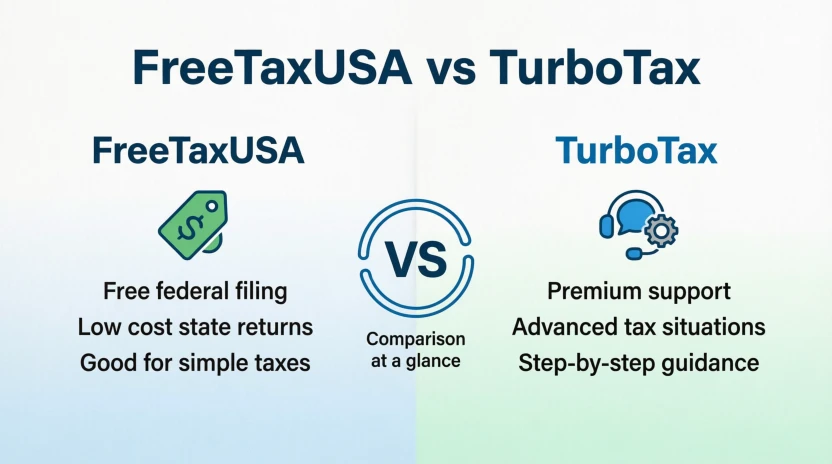
FreeTaxUSA is usually the better choice for people who want to file federal taxes for free and pay a low fee for a state return. TurboTax may be a better fit for people who prefer a more guided experience or want access to additional tax expert services.
The best choice depends on your income, deductions, investments, self-employment income, and comfort with tax forms. A simple return may not need expensive software. A more complex return may benefit from extra guidance.
In this guide, we compare FreeTaxUSA vs TurboTax by price, features, ease of use, customer support, and tax situations. You will also learn which service may suit beginners, freelancers, investors, and families.
Prices and offers can change during tax season. The figures below reflect the providers’ published pricing for 2025 tax returns, generally filed in 2026, unless stated otherwise. Always confirm your total before filing.
FreeTaxUSA vs TurboTax: Quick Answer
FreeTaxUSA is generally the better option for people who want low-cost federal tax filing, including many taxpayers with investments or self-employment income. It offers federal filing for $0 and charges $15.99 per state return. TurboTax offers a more guided experience and several levels of expert help, but its price depends on your tax situation and the service you choose.
FreeTaxUSA vs TurboTax: Quick Answer and Examples
Here is the simplest way to choose between these tax preparation services.
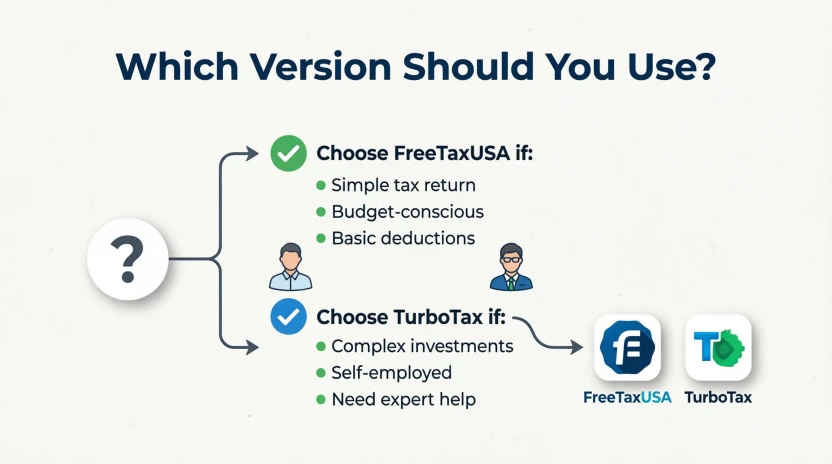
- Choose FreeTaxUSA if keeping costs low is your main goal.
- Choose TurboTax if you value detailed guidance and want the option to work with tax experts.
- Compare both if you have rental income, investments, business income, or several tax forms.
For example, an employee with one W-2 and a straightforward tax return may find either service suitable. Someone who sells stocks should check the supported forms and import options before choosing. A freelancer may prefer FreeTaxUSA’s free federal filing or TurboTax’s paid guidance, depending on the help needed.
Neither service automatically guarantees a larger refund than the other. Your refund depends on your income, withholding, deductions, credits, and eligibility.
What Does FreeTaxUSA vs TurboTax Mean?
FreeTaxUSA and TurboTax are commercial tax preparation services. They help people prepare and submit US federal income tax returns and, where supported, state income tax returns.
They serve a similar purpose, but their pricing models and user experiences differ.
What Is FreeTaxUSA?
FreeTaxUSA is an online tax filing service that offers free federal tax preparation for a wide range of tax situations. Its free federal service includes forms for investments, rental income, and self-employment.
For 2025 tax returns, its published prices include:
- Federal tax return: $0.
- State tax return: $15.99 per state.
- Basic support: $0.
- Optional Deluxe Support: $7.99.
Other optional services may cost extra. Check the current FreeTaxUSA pricing page before filing.
FreeTaxUSA is especially appealing to taxpayers who want to avoid paying more for federal tax software simply because their return includes additional forms.
What Is TurboTax?
TurboTax is tax preparation software offered by Intuit. It guides users through tax questions and helps them prepare their returns.
Its services include do-it-yourself filing, expert-assisted options, and full-service preparation in which a tax professional handles the return.
TurboTax may suit people who want more guidance throughout the process. However, paid features can increase the final cost.
Its free option is subject to eligibility rules, and some tax situations require a paid product. Review the official TurboTax online options to confirm which service covers your return.
The Origin of FreeTaxUSA and TurboTax
FreeTaxUSA and TurboTax are brand names, not alternative spellings of the same word. Their differences come from the services they provide, not from English spelling or grammar.
FreeTaxUSA focuses on affordable online tax filing, with federal returns available at no charge. Its business model includes fees for state returns and optional services.
TurboTax is part of Intuit’s tax software business. It offers different levels of assistance, from do-it-yourself preparation to professional tax help.
This history matters because the two brands are designed around different priorities. FreeTaxUSA emphasizes low-cost filing, while TurboTax offers several service levels for people who want different amounts of help.
For the most accurate information about current features, pricing, and service options, rely on each company’s official website rather than older reviews.
FreeTaxUSA vs TurboTax: Main Differences
Both services help prepare US income tax returns, but they are not identical.
| Feature | FreeTaxUSA | TurboTax |
| Federal filing | $0 for supported federal returns | Free option for eligible returns; paid options available |
| State filing | $15.99 per state for 2025 returns | Additional fees may apply, depending on product |
| Investments | Supported on the free federal service | Supported in applicable products |
| Self-employment | Supported on the free federal service | Supported in applicable products |
| Rental income | Supported on the free federal service | Supported in applicable products |
| Expert help | Optional paid support available | Expert-assisted and full-service options available |
| Pricing model | Low-cost federal filing with optional fees | Price varies by product and level of help |
| Best for | Cost-conscious filers | People who want more guided or expert-assisted options |
Prices and features may change. Check eligibility, state fees, and any add-ons before submitting your return.
British English vs American English: Which Applies?
FreeTaxUSA and TurboTax are designed for US tax filing, so the key difference is not British versus American spelling. It is if the service supports the tax return you need to file.
| Tax situation | What to know | Practical advice |
| US federal income tax | Both services prepare US federal returns | Compare price and supported forms |
| US state income tax | State filing may cost extra | Check the fee for your state |
| UK Self Assessment | These are not substitutes for UK tax software | Use a service designed for UK taxes |
| Canadian income tax | These services are not intended as Canadian tax filing solutions | Choose Canadian tax software |
| Australian tax return | These services are not designed for Australian individual tax returns | Use an Australian tax preparation service |
If you live outside the United States but must file a US tax return, check if your residency status, income sources, and required forms are supported. Do not assume that a US tax service can prepare every international tax return.
Which Version Should You Use?
The right choice depends on where you file and how much help you need.
United States
For US taxpayers, FreeTaxUSA is a strong starting point if price matters most. Its free federal service covers many common and complex tax situations.
TurboTax may be worth considering if you want a more guided process or access to expert assistance. Compare the full price, not just the advertised starting price.
United Kingdom
If you need to file a UK Self Assessment tax return, neither service should be your default choice. Look for software that supports HMRC requirements.
If you are a UK resident who also files US taxes, your situation may involve additional forms. Confirm that the software supports your specific filing needs.
Canada
Canadian tax returns follow Canadian rules. Choose software built for Canadian federal and provincial returns rather than assuming US software will work.
Australia
Australian individual tax returns use Australian tax rules and ATO requirements. Select software that supports Australian filing.
International Writing and Cross-Border Tax Situations
For international readers, the important question is which country’s tax return they need to file. A US citizen living abroad, for example, may still have US filing obligations.
Cross-border income can create additional reporting requirements. Consider qualified tax advice if you are unsure which forms apply.
Academic Writing
If you are comparing the services in a school assignment or research article, use their official pricing and feature pages. State the tax year and the date you checked the information.
Business Writing
For a business comparison, focus on total cost, supported forms, customer support, and the level of professional help available. Avoid claiming that one service is always better for every taxpayer.
Common Mistakes When Choosing FreeTaxUSA or TurboTax
Tax software can make filing easier, but choosing the wrong product or misunderstanding its price can lead to frustration.
| Common mistake | Better approach | Why it matters |
| Assuming TurboTax is always free | Check which forms the free option supports | Your return may require a paid product |
| Assuming FreeTaxUSA has no fees at all | Check state filing and optional service charges | Free federal filing does not mean every service is free |
| Choosing software based only on its advertised price | Calculate the total before filing | Add-ons and state fees can change the cost |
| Believing paid software guarantees a bigger refund | Enter accurate information and check eligible deductions and credits | Your tax facts determine your refund |
| Ignoring investment or rental forms | Confirm that the service supports your tax documents | Missing forms can make a product unsuitable |
| Treating tax software as a tax professional | Seek qualified advice when your situation is unclear | Software cannot replace every form of individual tax advice |
Memory tip: Compare the total cost and the forms you need, not just the word “free.”
Everyday Examples: FreeTaxUSA vs TurboTax
These examples show how different taxpayers might choose between the services.
1. An Employee With a W-2
A full-time employee receives a W-2 and has no unusual deductions or other income.
Possible choice: Either service may work. FreeTaxUSA is attractive if the employee wants free federal filing and a low-cost state return.
2. A Family With Children
A family may need to report wages, dependents, childcare expenses, and eligible tax credits.
Possible choice: Compare the forms each service supports and how clearly it explains eligibility. Do not assume that a more expensive product automatically produces a larger refund.
3. An Investor Who Sold Stocks
An investor may need to report stock sales and capital gains or losses.
Possible choice: FreeTaxUSA includes investment-related forms in its free federal service. TurboTax also supports investment reporting through applicable products. Compare document imports and the support available for your specific transactions.
4. A Freelancer or Independent Contractor
A freelancer may need to report business income and expenses, often using Schedule C.
Possible choice: FreeTaxUSA may save money because its free federal filing includes self-employment forms. TurboTax may appeal to a freelancer who prefers a more guided process or expert assistance.
5. A Landlord
A landlord may need to report rental income and eligible expenses.
Possible choice: Both services support rental-related tax situations through their applicable forms or features. Compare how each handles your situation, including depreciation and any other relevant reporting requirements.
6. A Taxpayer Who Wants Professional Help
Some people prefer to have a professional review or prepare their return.
Possible choice: TurboTax offers expert-assisted and full-service options. FreeTaxUSA also offers paid tax support, but the exact service level differs. Compare what each service includes before paying.
These are general examples, not personal tax advice. The best product depends on your full tax situation.
Google Trends and Modern Usage
People search for “FreeTaxUSA vs TurboTax” because they want to reduce tax preparation costs without giving up important features. They may also be switching providers, comparing customer support, or checking if free filing covers their income sources.
Common search variations include:
- FreeTaxUSA vs TurboTax for self-employed taxpayers.
- FreeTaxUSA vs TurboTax for investments.
- Is FreeTaxUSA really free?
- Is TurboTax worth the price?
- Which tax software is better for beginners?
- FreeTaxUSA state tax return cost.
- TurboTax free filing eligibility.
These searches show different needs. Some readers care most about price, while others want help with complicated forms.
It would be misleading to claim that one brand is more popular on Google without checking current, comparable search data. Search interest also changes during tax season and may vary by location.
For a useful comparison, check official prices, current features, and eligibility rules instead of relying on an unsupported popularity claim.
Quick Comparison Table: FreeTaxUSA vs TurboTax
| Version | Main benefit | Cost | Best suited for | Example |
| FreeTaxUSA | Free federal filing across many tax situations | $0 federal; $15.99 per state for 2025 returns | People who want to save money | Freelancer filing a federal return |
| TurboTax Free option | Guided preparation for eligible returns | $0 if eligible; terms apply | People with a qualifying return | Eligible taxpayer with a simple return |
| TurboTax paid DIY | More features for supported tax situations | Varies by product and timing | People who need additional forms or tools | Investor with reportable stock sales |
| TurboTax Expert Assist | DIY filing with access to tax experts | Additional cost may apply | People who want guidance | Taxpayer with questions about deductions |
| TurboTax Expert Full Service | A tax expert prepares the return | Depends on tax situation and service | People who prefer professional preparation | Taxpayer who does not want to prepare the return alone |
The listed FreeTaxUSA prices apply to 2025 tax returns. TurboTax pricing varies, so confirm your actual price before filing.
Key Takeaways
- FreeTaxUSA offers $0 federal tax filing for a wide range of tax situations.
- Its published state filing fee for 2025 returns is $15.99 per state.
- TurboTax provides free filing for eligible returns and paid options for additional needs.
- TurboTax offers expert-assisted and full-service preparation.
- FreeTaxUSA supports many investment, rental, and self-employment forms on its free federal service.
- Neither service guarantees a larger refund than the other.
- Always compare supported forms, state fees, optional services, and total cost.
- If you need to file taxes outside the United States, choose software designed for that country’s tax rules.
FAQs About FreeTaxUSA vs TurboTax
1. Is FreeTaxUSA better than TurboTax?
FreeTaxUSA may be better if your main goal is to keep filing costs low. It offers free federal tax preparation for many tax situations, including self-employment and investment income. TurboTax may be a better fit if you want more guided assistance or professional help. The right choice depends on your forms, budget, and comfort with tax preparation.
2. Is FreeTaxUSA really free?
Yes, FreeTaxUSA offers federal tax preparation and filing for $0 for its supported returns. State tax filing costs extra, with a published fee of $15.99 per state for 2025 returns. Optional support and other services may also cost extra. Check the current pricing page before filing so you understand the full amount you may pay.
3. Is TurboTax free to use?
TurboTax offers a free option for eligible tax returns. However, not every tax situation qualifies, and you may need a paid product if you have certain income types or require additional features. Check the forms covered by the free option before you begin. Review your price before submitting the return.
4. Which is cheaper, FreeTaxUSA or TurboTax?
FreeTaxUSA is often cheaper for taxpayers who need federal filing and a state return because federal filing is free and the published state fee is $15.99 for 2025 returns. TurboTax’s price varies by product, tax situation, and service level. Compare the complete price for your federal and state returns before deciding.
5. Can I use FreeTaxUSA if I am self-employed?
FreeTaxUSA supports self-employment tax situations on its free federal service, including relevant forms for independent contractors. You still need to report income and expenses correctly and confirm that the service supports your specific circumstances. If your business situation is complicated or you are unsure which deductions apply, consider advice from a qualified tax professional.
6. Is TurboTax better for beginners?
TurboTax may appeal to beginners who prefer a guided question-and-answer process and the option to get expert help. FreeTaxUSA also provides step-by-step preparation, so it can work for beginners who want to spend less. Try comparing the workflow and available help before filing. The best choice is the one you can use accurately and confidently.
7. Does FreeTaxUSA support investment income?
Yes, FreeTaxUSA supports many investment-related tax forms on its free federal service, including reporting stock sales. However, investment reporting can vary with the type of transaction and the documents you received. Check that your particular forms are supported, especially if you have unusual transactions or complicated investment activity.
8. Can FreeTaxUSA or TurboTax guarantee a bigger refund?
Neither service can guarantee that it will produce a larger refund than the other for the same taxpayer. Your refund depends on your income, tax withholding, deductions, credits, and eligibility. Accurate information matters more than the brand name. Review your return carefully and seek qualified advice if you are uncertain about a tax rule.
9. Can I switch from TurboTax to FreeTaxUSA?
You can switch tax software, but you should check which records and prior-year information you can import. FreeTaxUSA advertises options for importing prior returns from other providers. You may still need to verify your personal information, income details, deductions, and carryover amounts. Do not assume every field will transfer correctly.
10. Which tax software should I choose for 2026?
For tax returns filed in 2026 for the 2025 tax year, FreeTaxUSA is a strong choice if you want low-cost federal filing. TurboTax is worth comparing if you want a guided experience or expert services. Check current pricing, supported forms, and eligibility before filing. If you mean income earned during 2026, check the product details when those returns become available.
Conclusion: FreeTaxUSA vs TurboTax
When comparing FreeTaxUSA vs TurboTax, the best choice depends on how much you want to spend and how much help you need.
FreeTaxUSA is a strong option for people who want to file federal taxes for free. Its free federal service covers many tax situations, including investments, rental income, and self-employment. The published state filing fee for 2025 returns is $15.99 per state, which can make it an affordable option for many taxpayers.
TurboTax may be worth the extra cost if you prefer a more guided experience, need additional features, or want access to tax experts. Its free option is limited to eligible returns, and paid prices depend on your tax situation and selected service.
Before choosing, compare the forms you need, the state filing fee, the level of support, and the total price. Do not choose a service only because it advertises a free option, and do not assume a paid service will automatically give you a bigger refund.
Final recommendation: Choose FreeTaxUSA if saving money is your priority. Choose TurboTax if its guidance and available expert services better match your needs.
A smart tax software choice is the one that fits your tax situation, keeps costs clear, and helps you file accurately.
Read more about!
- Vizio vs. TCL: Which TV Brand Is Better?
- Goedert or Kincaid: Who Should You Start in 2026?
- Sudafed or DayQuil: Which Is Better for a Cold?

I’m Olivia Parker, a grammar and English writing enthusiast passionate about making English simple and easy to understand. Through Wordsblog, I share clear explanations, useful grammar tips, and practical writing guidance to help readers write with confidence. My goal is to make learning English easier, one word at a time.