Ubuntu and Linux Mint are both excellent Linux operating systems, but Linux Mint is often the easier choice for beginners, while Ubuntu is a strong option for developers and users who want a modern desktop with broad software support. The best choice depends on your computer, your work, and the desktop experience you prefer.
If you are switching from Windows, choosing your first Linux system can feel confusing. Both options are free, support everyday tasks, and let you browse the web, edit documents, watch videos, and install new software. They also share much of the same software foundation, so their differences are not always obvious.
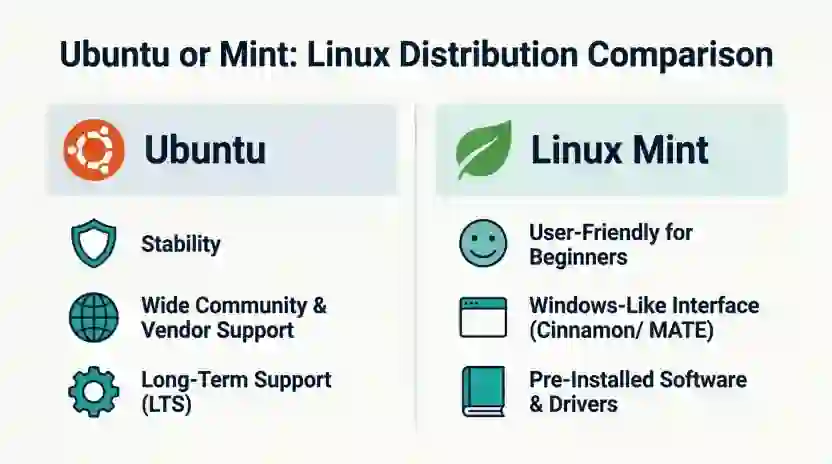
The main difference is the desktop experience. Ubuntu uses the GNOME desktop by default, while Linux Mint’s popular Cinnamon edition offers a more traditional layout with a familiar application menu and taskbar. Mint also provides MATE and Xfce editions for different needs.
In this guide, you will learn how Ubuntu and Linux Mint compare in ease of use, speed, software, security, updates, and hardware requirements. You will also find practical advice for students, home users, developers, businesses, and people with older computers.
Ubuntu or Mint: The Quick Answer
Linux Mint is often better for beginners and people who prefer a traditional desktop. Ubuntu is often better for users who want the standard Ubuntu environment, a broad development ecosystem, and direct access to Ubuntu-specific documentation and support options.
Choose Linux Mint if you want a familiar desktop and a straightforward setup. Choose Ubuntu if you prefer GNOME, work with Ubuntu-based tutorials, or need a platform commonly used in development and technical environments.
Neither operating system is automatically faster, safer, or better for every computer. Your hardware, software needs, and chosen version all matter.
Ubuntu or Mint: Quick Answer
Here is the simplest way to decide:
- Choose Linux Mint for a Windows-like desktop, simple everyday computing, and a familiar application menu.
- Choose Ubuntu for its GNOME desktop, Ubuntu-focused development resources, and wider range of official desktop flavors.
- Choose Mint Xfce if you want a lightweight desktop experience.
- Choose Ubuntu if your workplace, course, or software instructions specifically require Ubuntu.
For example, a student writing assignments and browsing the web may prefer Mint Cinnamon. A developer following a tutorial written specifically for Ubuntu may find Ubuntu more convenient. Someone with an older laptop could test Mint Xfce before making a final choice.
What Does Ubuntu or Mint Mean?
Ubuntu and Linux Mint are Linux distributions. A Linux distribution combines the Linux kernel with software, system tools, an installer, and a desktop environment to create a complete operating system.
Although they share a foundation, they offer different default experiences.
What Is Ubuntu?
Ubuntu is a free, open-source operating system developed and maintained by Canonical with contributions from the wider community. Ubuntu Desktop is designed for personal computers and can also support professional tasks, software development, and technical work.
Ubuntu’s standard desktop uses GNOME. Its layout, settings, and workflow differ from the traditional Windows desktop, although users can customize many parts of the experience.
Ubuntu also offers official flavors with different desktop environments, including Kubuntu and Xubuntu. This gives users more options than the standard Ubuntu desktop alone.
What Is Linux Mint?
Linux Mint is a free, open-source operating system designed to be comfortable and easy to use. Its main editions are Cinnamon, MATE, and Xfce.
- Cinnamon: A polished desktop with a traditional menu, panel, and taskbar-style workflow.
- MATE: A classic desktop that emphasizes simplicity and familiar controls.
- Xfce: A lightweight desktop that uses fewer resources than many feature-rich environments.
Linux Mint’s main edition is based on Ubuntu, while Linux Mint Debian Edition uses Debian as its base. This means that Mint and Ubuntu are closely related, but they are not identical.
The Origin of Ubuntu and Linux Mint
Ubuntu was first released in 2004. Its goal was to make Linux accessible to a broad audience while providing a regular release cycle and long-term support options. The name comes from an African philosophy associated with humanity and community.
Linux Mint first appeared in 2006. It developed a following among desktop users who wanted a comfortable Linux experience with useful applications and practical desktop tools. Its interface and approach to everyday computing helped distinguish it from Ubuntu.
The two projects later developed different desktop experiences. Ubuntu adopted GNOME as its default desktop, while Linux Mint developed Cinnamon after changes in the GNOME desktop led the Mint team to pursue a more traditional interface.
Their differences are therefore not simply about appearance. They reflect different choices about desktop design, default tools, updates, and the experience each project wants to provide.
British English vs American English
Ubuntu and Mint are operating systems, not alternative English spellings. The phrase British English vs American English does not apply to their names or technical definitions.
However, regional language preferences can affect documentation, menus, spelling in examples, and how users search for technical help.
| British English | American English | Example |
| installation | installation | Install Linux Mint. |
| programme, in some general contexts | program | Install a program on Ubuntu. |
| customise | customize | Customise the desktop in the UK; customize it in the US. |
| favourite | favorite | Choose your favourite desktop environment. |
| licence, as a noun | license | Check the software licence or license. |
Technical terms such as Ubuntu, Linux Mint, GNOME, Cinnamon, and Xfce retain the same names in both regions.
For software documentation, follow the spelling and terminology used by the publisher or organisation. For general writing, use the regional English style expected by your readers.
Which Version Should You Use?
Your best choice depends more on your intended use than on which distribution is more popular.
United States
Both systems are suitable for home users, students, and professionals. Choose Mint for a traditional desktop or Ubuntu if you prefer GNOME and Ubuntu-specific technical resources.
United Kingdom
Both are practical options for everyday computing. Linux Mint can be comfortable for users moving from Windows, while Ubuntu is a good choice for people following Ubuntu-based learning materials.
Canada
Either system can handle common tasks such as web browsing, office work, and programming. Check that your required applications, printers, Wi-Fi adapters, and other devices work before installing.
Australia
The same general advice applies. Choose based on your desktop preference, hardware, and software requirements rather than your location.
International Writing and General Use
For international teams, either system can work well. Check language support, keyboard layouts, accessibility tools, and the applications your team needs.
Academic Writing and Study
Linux Mint is a practical option for writing essays, reading research, attending online classes, and using office software. Ubuntu is also suitable and may be more convenient when a course specifically uses Ubuntu in its instructions or computer labs.
Business Writing and Professional Work
Both can run productivity tools, web applications, and compatible business software. Before choosing either system for a workplace, verify support for essential applications, company security requirements, device management, and technical support.
Software Development
Ubuntu is often the more convenient option when development documentation explicitly targets Ubuntu. Many Linux tutorials, deployment instructions, and technical environments use Ubuntu as their reference platform.
Linux Mint also supports programming tools and much of the same software ecosystem. Developers should check the versions and dependencies required by their projects.
Common Mistakes When Choosing Ubuntu or Mint
Choosing between these systems is not about finding one universally correct answer. Avoid these common assumptions.
| Incorrect assumption | Correct understanding | Memory tip |
| Linux Mint and Ubuntu are identical. | They share a foundation but have different defaults and desktop experiences. | Same roots, different experience. |
| Ubuntu is always faster. | Speed depends on hardware, desktop environment, services, and workload. | Test your own computer. |
| Mint only works for beginners. | Mint supports everyday work, software development, and other technical tasks. | Simple does not mean limited. |
| Ubuntu is too difficult for new users. | Ubuntu has a graphical desktop, installer, software tools, and documentation. | A different layout takes practice. |
| Every Ubuntu application works perfectly on Mint. | Many compatible applications work, but dependencies and packaging can differ. | Check the app’s requirements. |
| Every Linux distribution supports every device. | Hardware support depends on drivers, firmware, and the device itself. | Test Wi-Fi, sound, and graphics. |
One particularly important mistake is choosing an operating system based only on a claim that it is lightweight. A lightweight desktop can help on an older machine, but background services, browser tabs, graphics support, and the age of the hardware also affect performance.
Everyday Examples: Ubuntu vs Linux Mint
These examples show how the differences can affect real users.
Emails
If you mainly send emails, manage calendars, and use a browser, either operating system should be suitable with compatible applications. Choose the desktop you find easier to navigate.
Business Writing
A small business can use either system for reports, spreadsheets, documents, and online services. Confirm that the company’s required office tools and document formats work as expected.
News and Web Browsing
Both systems can support everyday web browsing and news reading. The browser and number of open tabs may affect performance more than the distribution name.
Blogs and Content Creation
Bloggers can use either system for writing, editing website content, managing images, and publishing through a web browser. The better option is the one that works smoothly with your preferred tools.
Social Media
Most social media services are accessed through a browser, so both systems are practical choices. Some services may offer desktop apps, but availability varies by platform.
Academic Work
Students can write assignments, read PDFs, use reference websites, and join online classes on either system, provided the required applications and devices are compatible.
Daily Conversation and Home Use
For watching videos, organising files, listening to music, and checking messages, both are capable options. Linux Mint may feel more familiar to Windows users because of its traditional desktop layout.
Programming
A developer following an Ubuntu-specific installation guide may save time by using Ubuntu. A developer working with common Linux tools can often use Mint, too, as long as the project dependencies are supported.
Google Trends and Modern Usage
People search for “Ubuntu or Mint” because they want a direct comparison before installing Linux. Common questions include which system is easier, which runs better on an old laptop, which is better for gaming, and which is more suitable for programming.
The broad usage pattern is clear: Linux Mint attracts users who value a familiar desktop, while Ubuntu attracts users who want its default GNOME experience, official documentation, and established place in development environments.
However, these are general observations, not measured search statistics. Without checking a defined Google Trends region and time range, it would be misleading to claim that one keyword is more popular or to give exact search-volume figures.
Modern Linux distributions also change over time. New releases may alter desktop features, hardware support, application versions, and system requirements. Always compare the specific supported releases you plan to install, rather than relying on an old review.
For example, Linux Mint 22.3 is listed as a supported release with support through April 2029. Ubuntu 26.04 LTS is listed with standard support through April 2031. These dates apply to those releases, so verify the official lifecycle pages before making a long-term decision.
Ubuntu vs Linux Mint: Quick Comparison Table
| Version | Meaning | Correct? | Region | Example |
| Ubuntu | A Linux distribution with GNOME by default on Ubuntu Desktop | Yes | Worldwide | Use Ubuntu for an Ubuntu-based development guide. |
| Linux Mint | A Linux distribution with Cinnamon, MATE, and Xfce editions | Yes | Worldwide | Use Mint Cinnamon for a traditional desktop. |
| Mint Xfce | A lightweight Linux Mint edition | Yes | Worldwide | Test it on a computer with limited resources. |
| Ubuntu LTS | An Ubuntu long-term support release | Yes | Worldwide | Choose a supported LTS release for a longer support period. |
| Linux Mint Debian Edition | A Mint edition based on Debian rather than Ubuntu | Yes | Worldwide | Consider it if you specifically want Mint’s Debian-based edition. |
The key distinction is that Ubuntu and Linux Mint are both valid operating systems. The best choice depends on the edition, support period, software requirements, and desktop you prefer.
Key Takeaways
- Linux Mint is often the easiest starting point for people who prefer a traditional desktop.
- Ubuntu is a strong choice for GNOME users and people following Ubuntu-specific technical instructions.
- Linux Mint’s main edition is based on Ubuntu, but the two systems are not identical.
- Mint offers Cinnamon, MATE, and Xfce desktop editions.
- Both systems support everyday computing and many development tools.
- Performance depends on hardware, desktop choice, software, and background tasks.
- Check current support dates and hardware compatibility before installing.
- Try both from a live USB when possible before replacing your existing operating system.
FAQs About Ubuntu or Mint
1. Is Ubuntu or Mint better for beginners?
Linux Mint is often a good starting point for beginners who are familiar with Windows. Its Cinnamon desktop has a traditional menu and panel layout. Ubuntu is also beginner-friendly, but its GNOME desktop has a different workflow. Try both if possible, because personal comfort matters more than a general recommendation.
2. Is Linux Mint faster than Ubuntu?
Linux Mint can feel faster on some computers, particularly when using its lighter desktop editions. However, performance depends on your processor, memory, storage, drivers, background services, and applications. Do not assume Mint will always be faster. Test both systems on your own hardware before choosing.
3. Is Ubuntu safer than Linux Mint?
Neither system is automatically safer in every situation. Both benefit from Linux security features and software updates. Your safety also depends on using supported releases, installing trusted software, applying updates, and following sensible security practices. Check each project’s security guidance and update policies.
4. Can Linux Mint run Ubuntu applications?
Many applications made for Ubuntu also work on Linux Mint because its main edition uses Ubuntu as its software base. However, compatibility is not guaranteed for every package, driver, or third-party repository. Check the application’s requirements before installing it, especially when it depends on specific system libraries.
5. Which is better for an old laptop, Ubuntu or Mint?
Linux Mint Xfce is worth testing on an older laptop because Xfce is designed to use fewer resources than more feature-rich desktop environments. Actual performance depends on the machine. Check RAM, storage health, processor capability, Wi-Fi support, and the requirements of the specific operating system release.
6. Is Ubuntu better than Mint for programming?
Ubuntu is often more convenient when a development guide, deployment process, or work environment specifically targets Ubuntu. Mint can also run many common programming tools and development environments. Check project dependencies and version requirements first. If your employer or course specifies Ubuntu, using Ubuntu may reduce setup problems.
7. Does Linux Mint receive updates for as long as Ubuntu?
Not necessarily. Support periods depend on the specific release and its maintenance policy. Linux Mint 22.3 lists support through April 2029, while Ubuntu 26.04 LTS lists standard support through April 2031. These are different release timelines, so check the official lifecycle information for the versions you plan to use.
8. Can I install Ubuntu or Mint without removing Windows?
Yes, in many cases. You can try either system from a live USB without installing it, or set up a dual-boot arrangement that lets you choose between Windows and Linux when the computer starts. Back up your files first, and follow the installation instructions carefully to avoid accidental data loss.
9. Which is better for gaming, Ubuntu or Mint?
Both can support Linux gaming, including compatible Steam games. Results depend on the game, graphics card, driver, Proton compatibility, and launcher. Check the requirements of the games you play and test graphics performance before switching your main system. Neither distribution guarantees that every Windows game will run.
10. Can I switch from Ubuntu to Linux Mint later?
Yes, but changing distributions usually requires a fresh installation rather than a simple desktop setting change. Back up your documents, browser data, settings, and other important files first. You can then install Mint and restore your data. A live USB is a useful way to test Mint before making the switch.
Conclusion: Ubuntu or Mint, Which Should You Choose?
Ubuntu and Linux Mint are both capable Linux operating systems. They share much of the same software foundation, but they offer different desktop experiences and release choices.
For most people moving from Windows, Linux Mint Cinnamon is an excellent first option because its traditional layout feels familiar and its desktop is easy to navigate. Mint’s MATE and Xfce editions provide alternatives if you prefer a classic or lighter environment.
Ubuntu is a strong choice if you prefer GNOME, follow Ubuntu-focused development tutorials, or need to match an Ubuntu-based work or study environment. Its official documentation and range of desktop flavors also make it a useful option for different technical needs.
Before deciding, check hardware compatibility, supported releases, and the applications you rely on. If possible, boot both systems from a live USB and try your Wi-Fi, sound, display, browser, and daily tasks.
There is no single winner for everyone. Choose the Linux system that fits your computer and feels right for the way you work. If this comparison helped you decide, explore more practical technology guides to make your next Linux choice with confidence.
Read more about!
- Vizio vs. TCL: Which TV Brand Is Better?
- Goedert or Kincaid: Who Should You Start in 2026?
- Sudafed or DayQuil: Which Is Better for a Cold?

I’m Olivia Parker, a grammar and English writing enthusiast passionate about making English simple and easy to understand. Through Wordsblog, I share clear explanations, useful grammar tips, and practical writing guidance to help readers write with confidence. My goal is to make learning English easier, one word at a time.